
Best Audio Cable Guide for Home Studio Beginners
XLR, TRS, TRRS, 3.5mm and 6.35mm cables can look confusing when you are building your first audio setup. This guide breaks down the common connections and explains where each one actually makes sense.
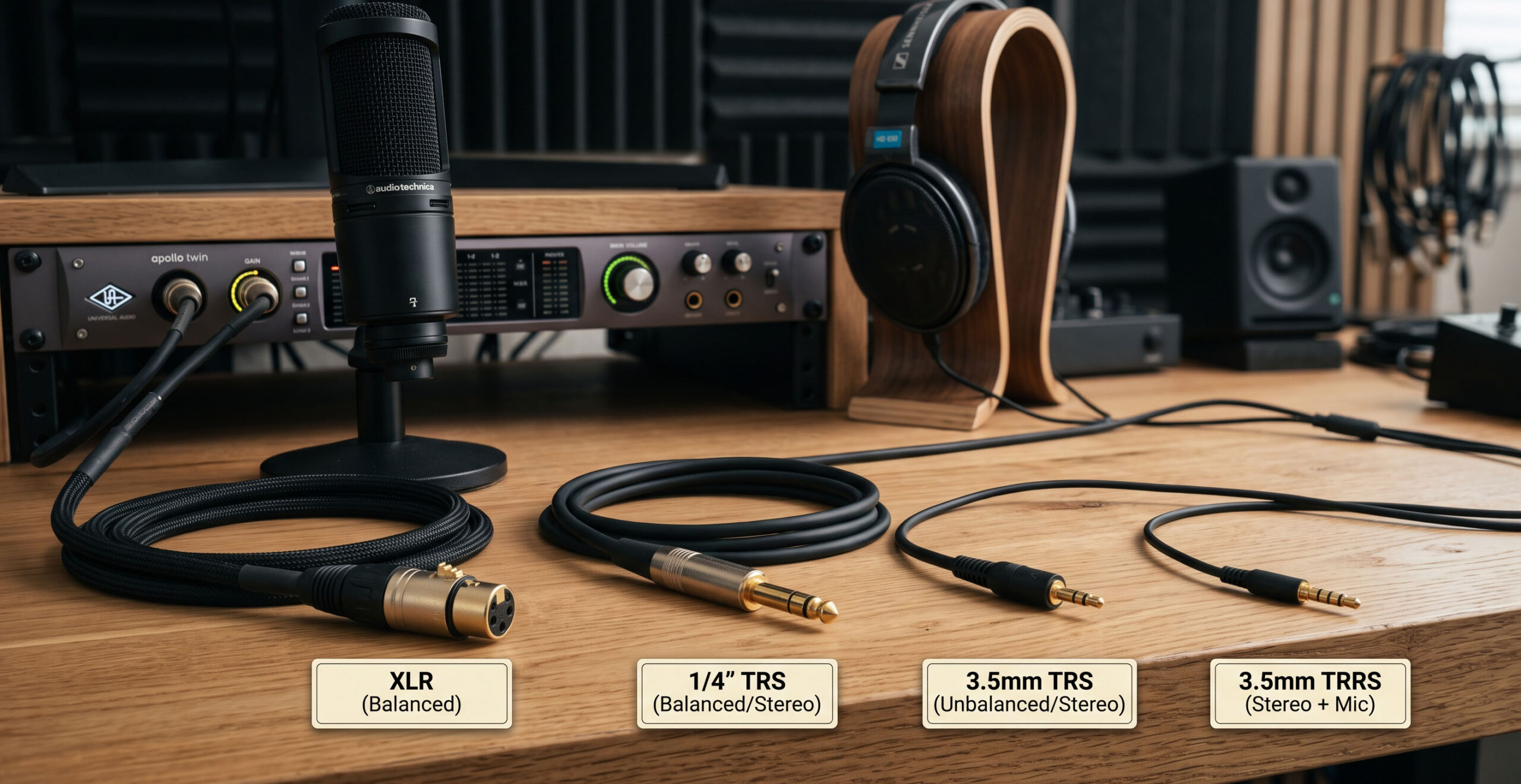
The right cable is about compatibility first.
Expensive cables are not automatically better. What matters first is choosing the correct connector, signal type and cable construction for the equipment you are connecting.
Why Audio Cables Matter
Audio cables are easy to overlook when building a home studio. Most of the attention usually goes to microphones, headphones, speakers and audio interfaces.
But the cable still has an important job: carrying the audio signal reliably between devices. Choosing the wrong connector can result in no signal, missing microphone input or an unnecessary amount of troubleshooting.
A correctly matched, well-built cable is usually a much better investment than simply buying the most expensive cable available.
XLR Microphone Cable
XLR is one of the most familiar connections in professional audio. It is widely used for microphones and other balanced audio connections.
Balanced connections are particularly useful when you need to reduce the effect of electrical interference, especially over longer cable runs.
Best for microphones
A natural choice for XLR microphones connected to an audio interface or mixer.
Good for longer runs
Balanced XLR connections can help minimise unwanted electrical noise when used correctly.
6.35mm TRS Cable
TRS stands for Tip, Ring and Sleeve. The 6.35mm version is commonly known as a quarter-inch connector and appears frequently in studio equipment.
Depending on the equipment and wiring, TRS can carry balanced mono audio or unbalanced stereo audio. That is why checking the equipment manual or input/output specification is important.
| Common Use | Connection | Typical Purpose |
|---|---|---|
| Audio Interface | TRS | Balanced line output |
| Studio Monitors | TRS | Line-level connection |
| Headphones | 6.35mm TRS | Stereo headphone output |
| Musical Instruments | 6.35mm jack | Instrument connection |
TRRS Headset Connection
TRRS adds another contact compared with a standard TRS connector. This allows a compatible headset connection to carry both headphone audio and microphone input through a single connector.
TRRS is commonly associated with smartphones, gaming headsets and compact mobile recording equipment.
Using the wrong adapter or connector can cause the microphone function to stop working even when the headphones still produce sound.
3.5mm Everyday Audio
The 3.5mm connector is probably the most familiar audio connector for everyday devices. It has been widely used with laptops, smartphones, portable speakers, gaming equipment and consumer headphones.
Its compact size makes it convenient, but it is generally more associated with shorter consumer audio connections than professional studio signal routing.
Compact and convenient
Useful for connecting everyday devices and consumer audio equipment.
Useful for short connections
A practical choice when connecting compatible portable or consumer devices.
Cable Build Quality Still Matters
Once the connector type is correct, construction quality becomes the next thing to consider.
Good cables generally have durable connectors, effective shielding and strong strain relief. These features can help the cable survive repeated plugging, unplugging and movement around a workspace.
Do not confuse expensive with better.
A more expensive cable does not automatically produce better sound. For a home studio, reliable construction and correct compatibility are usually more important than chasing an expensive cable simply because of its price.
Which Cable Should You Use?
The easiest way to choose is to start from the equipment you are connecting rather than from the cable itself.
XLR
Use an XLR connection when your microphone and audio interface provide XLR inputs and outputs.
TRS / 6.35mm
Common for compatible audio interfaces, studio monitors, mixers and headphones.
3.5mm / TRRS
Common for compatible laptops, phones, headsets and portable audio equipment.
A useful next read if you are building a beginner home recording setup.
A low-latency ASIO driver option for compatible Windows audio software and hardware.
Before Buying an Audio Cable
Know the connection before you buy the cable.
XLR, TRS, TRRS, 3.5mm and 6.35mm connectors all have their place. Once you understand what each connection is designed for, choosing cables for your home studio becomes much less confusing.